
The trust boundary
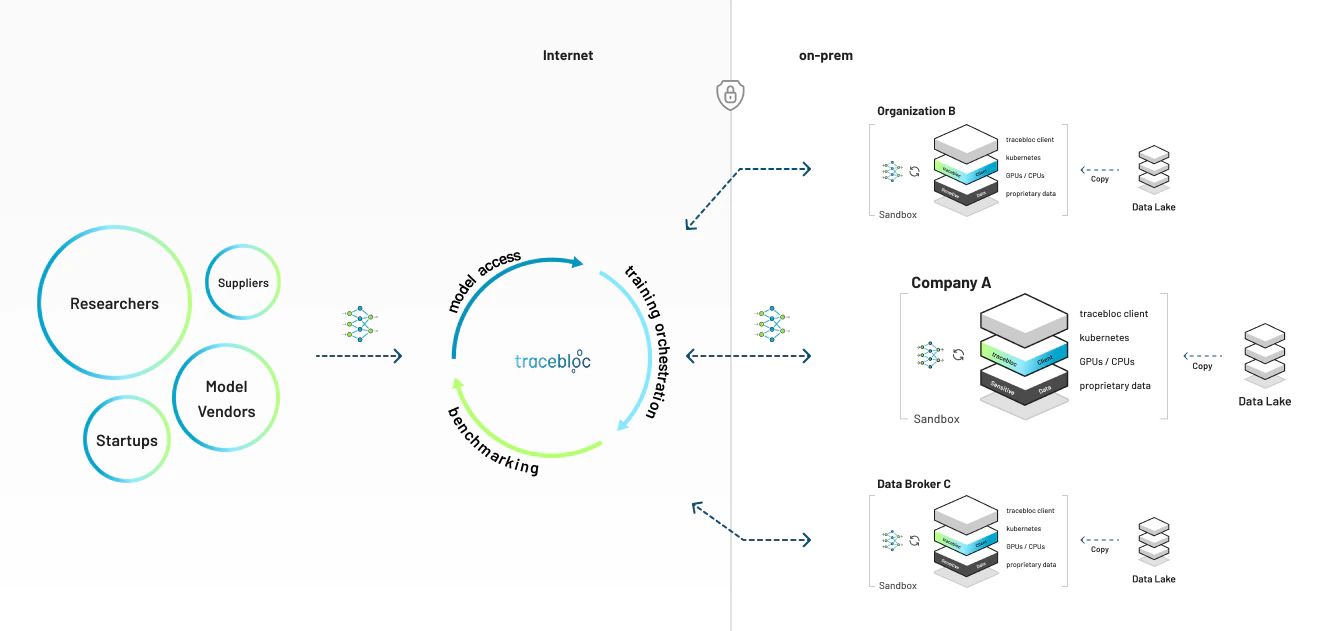
How it works
1
Deploy your secure environment
One command sets up your secure environment on your own infrastructure — a laptop, an on-prem server, or a cloud cluster.
2
Ingest your datasets
Stage your training and test data locally. Metadata syncs to the platform so peers can see what’s available — the raw data never moves.
3
Create a use case
Define a use case from your datasets and set how submitted models are evaluated.
4
Invite peers
Whitelist peers by email. Only the people you invite can take part.
5
Peers submit and train models
Each model is scanned for vulnerabilities, then trains against your data in an isolated container, on your hardware.
6
Results and weight updates are shared
Training and evaluation results flow back to you over TLS. The model’s weight updates go to tracebloc after each training cycle, where they are combined. Whether data scientists can download trained weights is your choice: the Weight Files setting in the use case’s admin panel (on by default).
What stays, what leaves
Control-plane logs (credentials redacted) and installer and CLI usage events (no paths, names or credentials) also leave, and you can opt out of both — see Security & data handling.
Enforced by per-job container isolation, a NetworkPolicy that restricts training-pod egress, a vulnerability scan before any model runs, and TLS on all traffic.
The mental model:
1 machine = 1 secure environment = n datasets. One deployment per machine; as many datasets inside it as you like.Vocabulary
What it touches
On Linux the installer adds native k3s, with no Docker; what it needs and adds there is in Linux prerequisites. On a Mac with Apple silicon and macOS 26 or later it adds k3s in Apple’scontainer runtime, with no Docker, no Homebrew and no administrator rights; what it needs and adds there is in Mac prerequisites. On Windows it adds k3s in tracebloc’s own WSL distro, with no Docker Desktop; what it needs and adds there is in Windows prerequisites. Everywhere it adds the tracebloc CLI and ~/.tracebloc, and switches kubectl’s current context to the new cluster. The full list is under Known footprint. Uninstalling is a single command, tracebloc delete, and your data is yours throughout.
Get started
Quick Start
A running secure environment in about 10 minutes, with one command.
Deployment environments
Deploy on a local machine, bare-metal, EKS, AKS, or OpenShift.
Want the guarantees in detail for your security team? See Security & data handling.