> ## Documentation Index
> Fetch the complete documentation index at: https://docs.tracebloc.io/llms.txt
> Use this file to discover all available pages before exploring further.
# Overview
> How tracebloc runs on your infrastructure — and why your data never leaves it.
**Models come to your data — your data never leaves your infrastructure.** You run a tracebloc *workspace* on your own hardware. Contributors submit models that are scanned and run in isolation against your data, on your machines. Only results leave — and trained model weights only if you choose to share them.
## The trust boundary
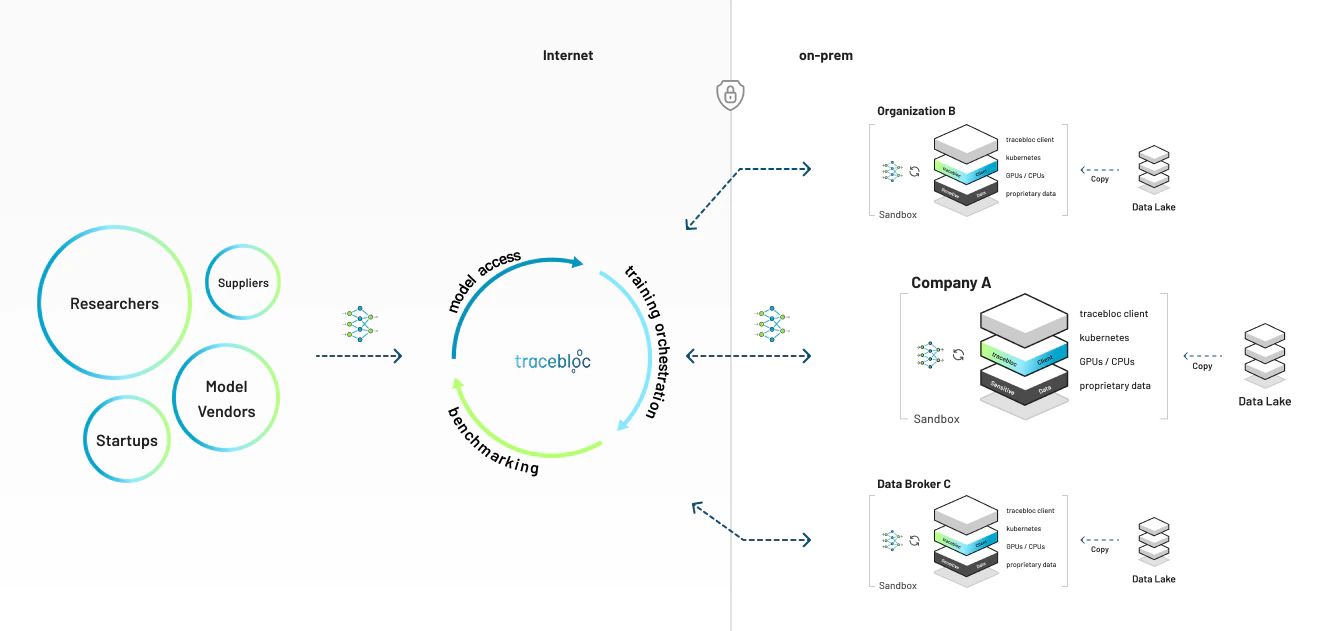 Raw data stays inside your infrastructure. Your workspace opens an **outbound-only** connection — nothing reaches in to pull your data out.
## How it works
One command sets up your private workspace on your own infrastructure — a laptop, an on-prem server, or a cloud cluster.
Stage your training and test data locally. Metadata syncs to the platform so contributors can see what's available — **the raw data never moves.**
Define a use case from your datasets and set how submitted models are evaluated.
Whitelist contributors by email. Only the people you invite can take part.
Each model is **scanned for vulnerabilities**, then trains against your data in an **isolated container**, on your hardware.
Training and evaluation results flow back to you over TLS. Trained model weights are shared **only if you choose to** — you control that in the admin panel.
## What stays, what leaves
| Data | Shared with the platform? |
| ------------------------------------- | -------------------------------------------------------------------------------- |
| Raw training & test data | **Never** — it stays on your infrastructure |
| Dataset metadata (schema, row counts) | Yes — so contributors know what's available |
| Training & evaluation results | Yes — the metrics models are judged on |
| Trained model weights | **Only if you allow it** — your choice per collaboration, set in the admin panel |
Enforced by per-job container isolation, a NetworkPolicy that blocks data egress from training pods, a vulnerability scan before any model runs, and TLS on all traffic.
**The mental model:** `1 machine = 1 workspace = n datasets`. One deployment per machine; as many datasets inside it as you like.
## Vocabulary
| Term | What it is |
| --------------- | ------------------------------------------------------------------------------------------------------------------------------------------------------------ |
| **Workspace** | Your private, dedicated AI environment — tracebloc's software running on your own infrastructure, where you invite contributors to train models on your data |
| **Client ID** | The credential that connects your workspace to the platform (created on the clients page) |
| **Dataset** | Data you've staged locally for use cases |
| **Use case** | A task contributors build models for, against your datasets |
| **Contributor** | An external data scientist who submits models — and never sees your raw data |
## What it touches
The installer changes only **Docker** and **`~/.tracebloc`** on your host — no system-wide changes. Uninstalling is a single command, and your data is yours throughout.
## Get started
A running workspace in about 10 minutes, with one command.
Deploy on local / k3d, bare-metal, EKS, AKS, or OpenShift.
Want the guarantees in detail for your security team? See [Security & data handling](/environment-setup/configuration#security).
Raw data stays inside your infrastructure. Your workspace opens an **outbound-only** connection — nothing reaches in to pull your data out.
## How it works
One command sets up your private workspace on your own infrastructure — a laptop, an on-prem server, or a cloud cluster.
Stage your training and test data locally. Metadata syncs to the platform so contributors can see what's available — **the raw data never moves.**
Define a use case from your datasets and set how submitted models are evaluated.
Whitelist contributors by email. Only the people you invite can take part.
Each model is **scanned for vulnerabilities**, then trains against your data in an **isolated container**, on your hardware.
Training and evaluation results flow back to you over TLS. Trained model weights are shared **only if you choose to** — you control that in the admin panel.
## What stays, what leaves
| Data | Shared with the platform? |
| ------------------------------------- | -------------------------------------------------------------------------------- |
| Raw training & test data | **Never** — it stays on your infrastructure |
| Dataset metadata (schema, row counts) | Yes — so contributors know what's available |
| Training & evaluation results | Yes — the metrics models are judged on |
| Trained model weights | **Only if you allow it** — your choice per collaboration, set in the admin panel |
Enforced by per-job container isolation, a NetworkPolicy that blocks data egress from training pods, a vulnerability scan before any model runs, and TLS on all traffic.
**The mental model:** `1 machine = 1 workspace = n datasets`. One deployment per machine; as many datasets inside it as you like.
## Vocabulary
| Term | What it is |
| --------------- | ------------------------------------------------------------------------------------------------------------------------------------------------------------ |
| **Workspace** | Your private, dedicated AI environment — tracebloc's software running on your own infrastructure, where you invite contributors to train models on your data |
| **Client ID** | The credential that connects your workspace to the platform (created on the clients page) |
| **Dataset** | Data you've staged locally for use cases |
| **Use case** | A task contributors build models for, against your datasets |
| **Contributor** | An external data scientist who submits models — and never sees your raw data |
## What it touches
The installer changes only **Docker** and **`~/.tracebloc`** on your host — no system-wide changes. Uninstalling is a single command, and your data is yours throughout.
## Get started
A running workspace in about 10 minutes, with one command.
Deploy on local / k3d, bare-metal, EKS, AKS, or OpenShift.
Want the guarantees in detail for your security team? See [Security & data handling](/environment-setup/configuration#security).